Apple Authenticator
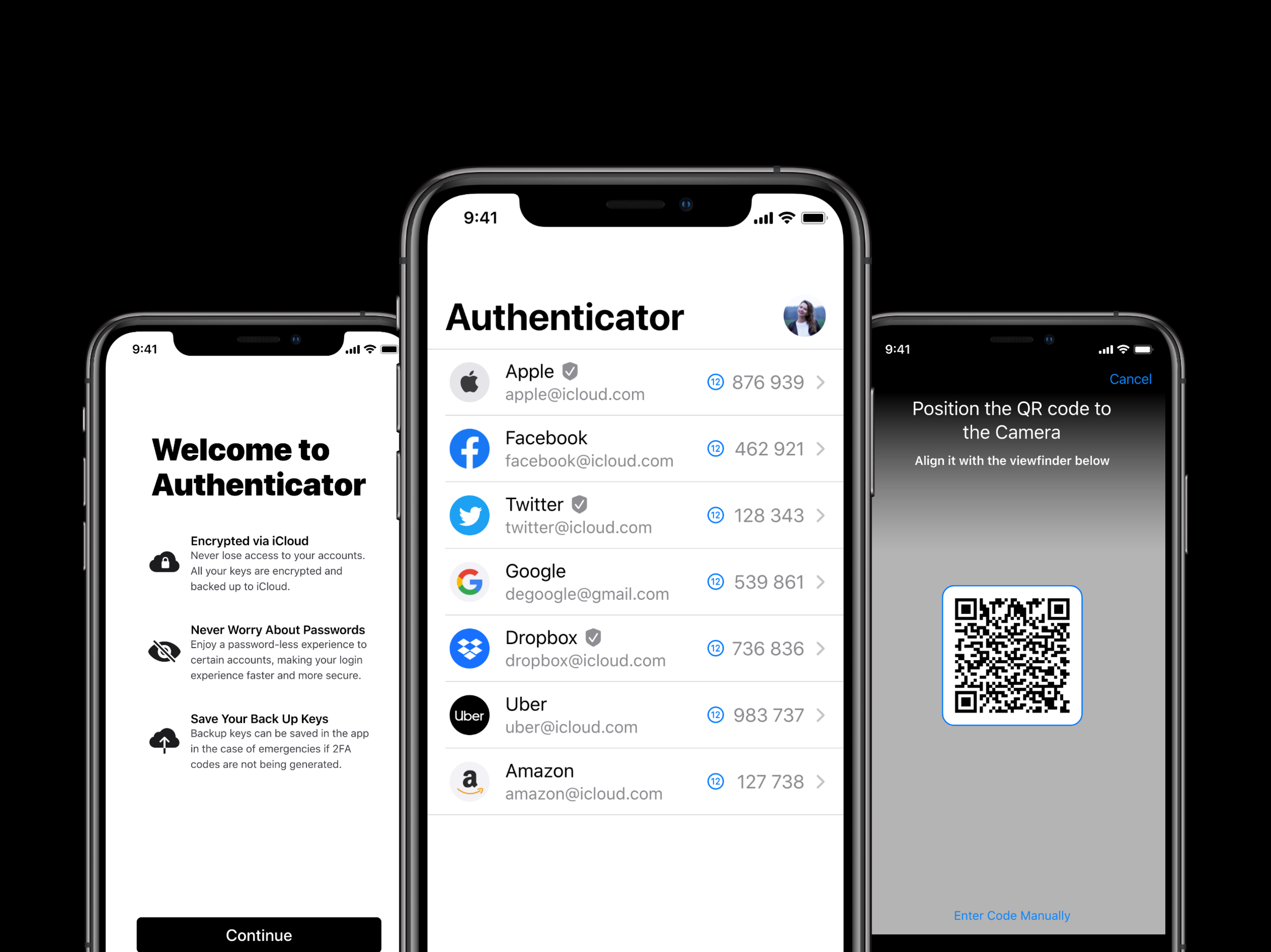
Apple Authenticator
For my concept project, I explored how Apple could expand its security ecosystem by providing a unified two-factor authentication solution that works with any service, not just iCloud.
UX Research
Ayman Jaddaa
UX Design
Ayman Jaddaa
Visual Design
Ayman Jaddaa
Role
UX Researcher & Designer
Duration
3 weeks
Focus
Product Design & Research
Tools
Adobe XD, Illustrator, Whimsical
Read
4 min read
Overview
Apple’s two-factor authentication (2FA) system, used on over a billion devices, is very secure and intuitive but is unfortunately limited to iCloud accounts. Apple’s two main competitors — Google and Microsoft — have their own apps for 2FA, and Apple lags behind them in supporting 2FA for non-Apple products and services.
There has been a progressive increase in the number of consumers who like Apple’s stance on privacy and security, and use Apple products and services for that reason. To increase user security awareness, Apple should provide users with a solution that is integrated, simple, and intuitive.
Problem
The current experience using Apple’s 2FA can be improved for several reasons:
No Offline Codes
Doesn't offer offline 6-digit codes like competitors
Internet Required
Users need their devices connected to receive notifications
Manual Code Entry
Users have to manually enter the 6-digit code instead of copying
iCloud Only
Limited to Apple accounts, unlike Google and Microsoft solutions
The “Sign In with Apple” Gap
Apple recently introduced the “Sign In with Apple” feature, but there is a massive flaw in the implementation: developers only have to include it if they also have “Login with Google” or “Login with Facebook” options. This means users can’t use the new feature with Google, Amazon, Microsoft, Uber accounts, among other sites.
Solution
I designed the Apple Authenticator app to fill the gap in Apple’s technology with ensuring that its users are secure, not only when using iCloud 2FA, but also when using day-to-day services personally or professionally.
Core Features
The new Apple Authenticator app would be a standalone app that comes pre-installed on every Apple device:
- Manage, edit, delete and save backup codes in one place
- Generate verification codes offline
- Support for all services compatible with Google Authenticator
- Seamless iCloud backup and sync
Introducing Apple Swift Login
A multi-factor authentication (MFA) solution that would be enabled automatically if a user has 2FA enabled and has an account with Sign in with Apple:
- Users simply approve a login request by typing in their Apple ID
- Verify identity via TouchID and/or FaceID instead of typing password
- No need to receive and manually enter a six-digit code
This would require Apple to release an Authenticator API called AuthKit. By leveraging Apple’s FaceID, TouchID and any other security mechanisms available, Apple and other companies can be 99.9% sure it’s the actual account owner logging in.
Research
Primary Research: Instagram Polls
I asked my Instagram followers (mostly between ages 19-30) three questions:
Do you know what 2FA is?
85 responses
Do you have it enabled on personal accounts?
73 responses
Competitive Analysis

Google Authenticator

Microsoft Authenticator

Authy

1Password
LastPass
Duo
Key User Pain Points
Through secondary and primary research, I identified four key user pain points:
- Lack of awareness — Users don’t understand what 2FA is or why they need it
- Inconvenience — Extra steps feel like friction rather than security
- Lack of offline support — Many apps require internet connection
- Poor user experience — Complicated interfaces and manual code entry
Information Architecture
Having an information architecture diagram helped me understand the data users will see and how they can navigate through the app. Because of the simplicity and minimal number of actions, this diagram helped ensure all information was shown clearly and logically.
Visual Design
I used Apple’s iOS 13 Design Kit while adhering to Apple’s Human Interface Guidelines to design high-fidelity wireframes. I studied all default iPhone apps to understand how to lay everything out in the most straightforward and user-friendly way.
Launch & Setup
Screenshots coming soon — add images to /public/media/showcases/apple-authenticator/
Adding Accounts
- QR code scanning interface
- Manual code entry (two-step process)
- Account confirmation
Managing Accounts
- Account list with reordering capability
- Edit account screen
- Backup code storage
- Account deletion flow
Approving Requests
- Login request notification
- Approve/Deny interface with FaceID/TouchID verification
- Success confirmation
Results & Learnings
Sometimes the user doesn’t know what they want until you show them
When my test group saw the Apple Swift Login feature, they fell in love with the idea of having a password-less login experience because of its fluidity, saved time and minimal effort.
Security became a priority through necessity
Apple has been working hard on focusing on privacy and security with features like password suggestions, two-factor authentication on Apple IDs and more. A few years after the celebrity iCloud photo leak during WWDC 2019, they introduced the “Sign in with Apple” feature.
An integrated solution is always the best option
While many 2FA apps meet the criteria of being useful, usable, and desirable, the one thing they all lack is the power of system integration. Apple could bring great benefit to the safety of its users on a massive scale by stepping in to solve this issue.
Design Philosophy
I used Apple’s official iOS Design Kit with minimal design changes because I wanted to design an app that focused more on the user experience than the user interface. The main goal behind this app was to focus on its usability and value.
This was exploratory concept work created to demonstrate end-to-end product thinking and design process.